Cloud accounting is a digital, cloud-based accounting system that automates bookkeeping tasks, syncs financial data in real time, and helps PH MSMEs stay BIR-compliant without relying on manual spreadsheets or desktop installations. Instead of saving records on a single computer, cloud accounting stores financial data securely online so business owners, bookkeepers, or accountants can access it anytime using a phone, tablet, or laptop.
For small businesses in the Philippines, this means fewer manual errors, faster reporting, and easier compliance with BIR rules especially for issuing receipts, organizing expenses, and preparing taxes. Cloud accounting replaces slow, manual, paper-heavy workflows with automated, organized, and centrally accessible financial data.
What Is Cloud Accounting? (Simple Definition for Beginners)
Cloud accounting is a web-based accounting system where financial records—like sales, expenses, invoices, and reports—are stored on secure online servers instead of a local desktop computer. This allows MSMEs to record transactions, track revenue, manage books, and prepare reports from any device with internet access.
In simpler words: Cloud accounting = Accounting software + Online storage + Automation + PH compliance
This single system replaces:
-
Manual encoding in Excel
-
Physical ledgers
-
Desktop accounting software
-
Multiple disconnected tools
Cloud accounting automates data entry, syncs information across devices, and records financial activity in real time—making it ideal for MSMEs with limited staff or time.
How Cloud Accounting Works (Simple Step-by-Step for PH (MSMEs)
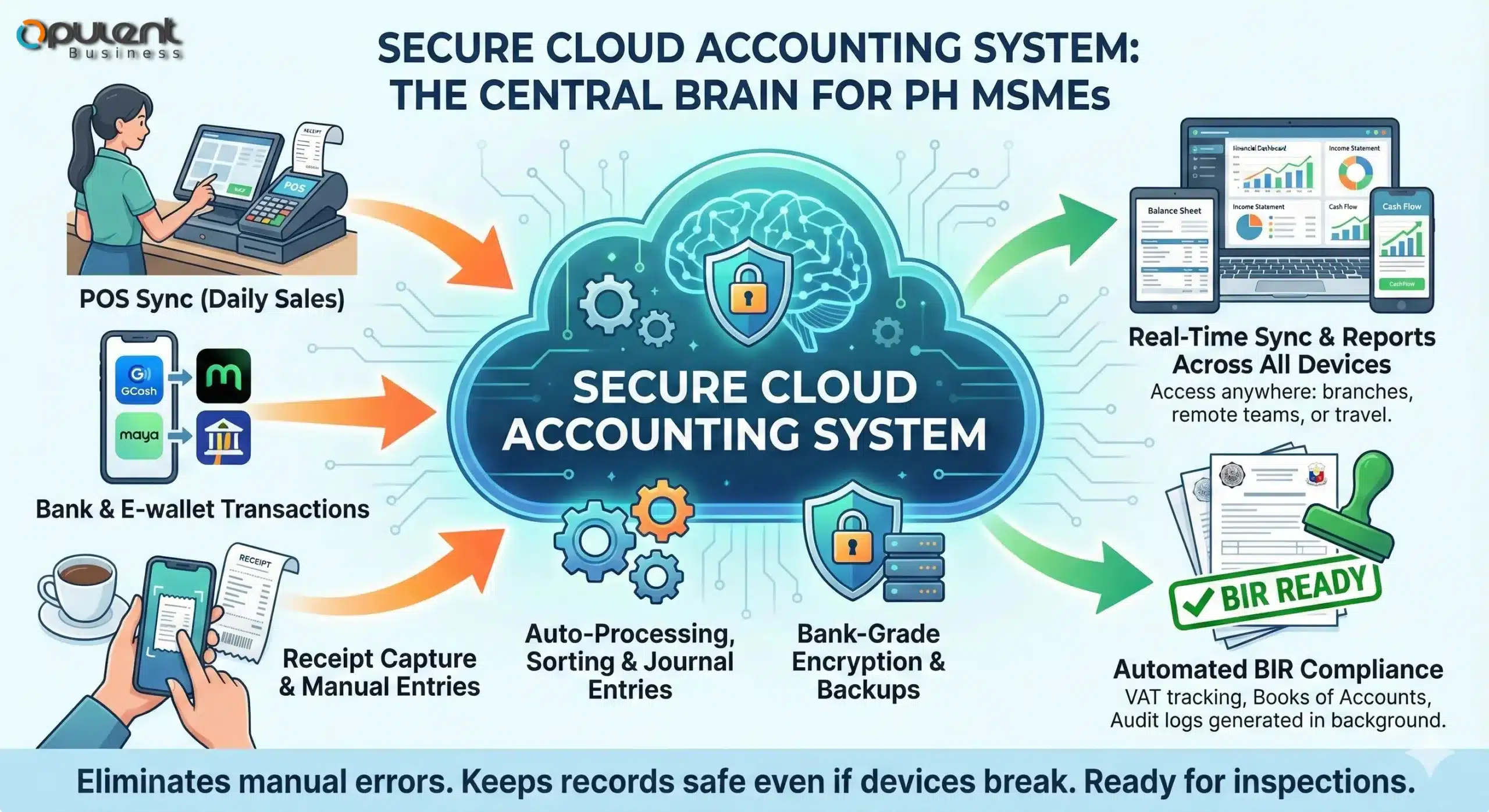
Cloud accounting works by collecting, processing, and storing your business’s financial data on secure cloud servers instead of a single offline computer. Every time your business records a sale, expense, or payment, the system automatically updates your books, syncs data across devices, and creates organized records that are ready for BIR reporting.
Below is the exact process of how it works for Philippine MSMEs:
1. Data Is Entered or Captured (Manually or Automatically)
Cloud accounting receives data through:
-
Manual input (e.g., encoding expenses, adding invoices)
-
POS system sync (daily sales)
-
Bank or e-wallet transactions
-
Uploaded receipts
-
Mobile phone entries
Micro-semantics example:
Cloud accounting records and organizes financial data as soon as it enters the system, keeping the business books updated in real time.
2. The System Automatically Processes the Data
Once the data is received, the system:
-
Automates journals
-
Classifies expenses
-
Reconciles amounts
-
Matches sales to categories
-
Validates entries
This eliminates manual encoding errors that PH MSMEs often struggle with.
3. All Data Is Stored Securely Online
Instead of saving files on a laptop (which can break, be stolen, or get corrupted), cloud accounting keeps data in secure cloud servers with:
-
Encryption
-
Automated backups
-
Redundant storage
-
Controlled access
This ensures MSME financial records remain safe—even during device loss or BIR audit preparation.
4. Real-Time Syncing Across All Devices
Any update—expense added, sale recorded, invoice created—is instantly synced across phones, tablets, laptops, and accountant dashboards.
This helps MSMEs that:
-
Have multiple branches
-
Have remote teams
-
Need owners to check reports while traveling
-
Need bookkeepers and accountants to collaborate quickly
5. Reports and Books Are Automatically Generated
The system uses all synced data to generate:
-
Income Statement
-
Balance Sheet
-
Cash Flow
-
Sales Summary
-
VAT or Percentage Tax reports
-
Books of Accounts
6. The System Ensures PH BIR Compliance (In the Background)
Without doing anything manually, the system:
-
Formats OR/SI correctly
-
Tracks VAT/PT properly
-
Maintains digital Books of Accounts
-
Keeps audit logs
-
Prepares e-invoicing records
This makes cloud accounting especially helpful for MSMEs during inspections, renewals, and filings.
Key Features of Cloud Accounting Software (Explained for PH MSMEs)
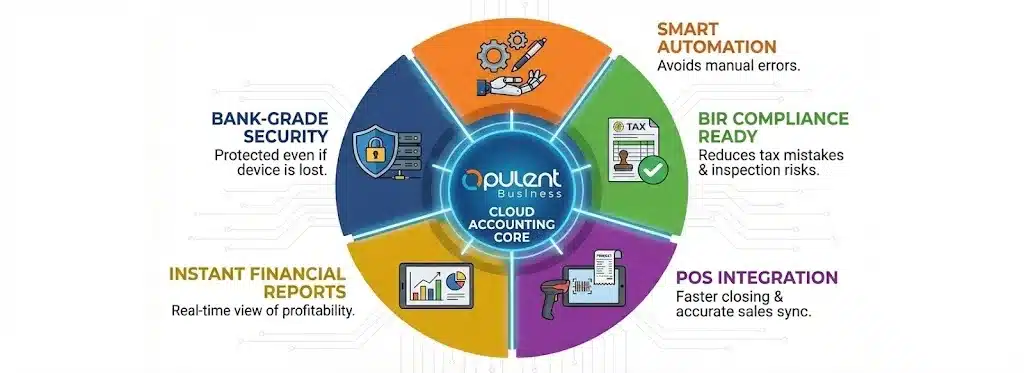
Cloud accounting software includes several core features that automate, record, organize, and secure financial data for Philippine MSMEs. Each feature is designed to reduce manual work, improve accuracy, and support local BIR compliance requirements.
Below are the mandatory attributes structured in the correct semantic order.
Automation Features
Cloud accounting automates many repetitive bookkeeping tasks that MSMEs usually perform manually, such as creating journal entries, classifying expenses, and calculating totals. When transactions are entered into the system—either through manual input or synced data—the software generates the correct accounting entries and updates financial records instantly.
This automation helps PH MSMEs avoid common errors that happen with Excel-based or handwritten books, especially during busy days when owners or staff have little time to manage accounting tasks.
BIR Compliance Features
Cloud accounting supports BIR compliance by formatting, tracking, and organizing financial documents according to local requirements. It can generate OR/SI formats compliant with BIR rules, maintain digital Books of Accounts, and prepare VAT or Percentage Tax summaries automatically.
These features help MSMEs reduce tax-related mistakes, especially when preparing RDO requirements, responding to BIR inspections, or filing monthly and quarterly reports.
POS Integration Features
Cloud accounting can sync daily sales, receipts, and transaction summaries from directly into the accounting dashboard. Instead of manually encoding totals at the end of the day, the system imports sales data automatically and reconciles it with the business’s chart of accounts.
For PH MSMEs, this means faster closing, fewer discrepancies, and more accurate financial records across branches or cashiers.
Reporting & Financial Statements
Cloud accounting generates essential financial reports—such as Income Statements, Balance Sheets, Cash Flow Statements, and Sales Summaries—using the data recorded in the system. These reports update in real time, giving MSME owners a clear view of revenue, expenses, and profitability without manual preparation.
Automated reporting also helps businesses prepare required statements for banks, investors, and government submissions.
Security & Data Protection Features
Cloud accounting platforms store financial data on secure servers that use encryption, redundant backups, and role-based access controls. This ensures that important business information remains protected even if a device is lost, damaged, or stolen.
For MSMEs that rely on shared devices or remote staff, built-in security helps prevent unauthorized access and maintains the integrity of financial records.
Cloud Accounting vs Traditional Accounting (PH MSME Perspective)
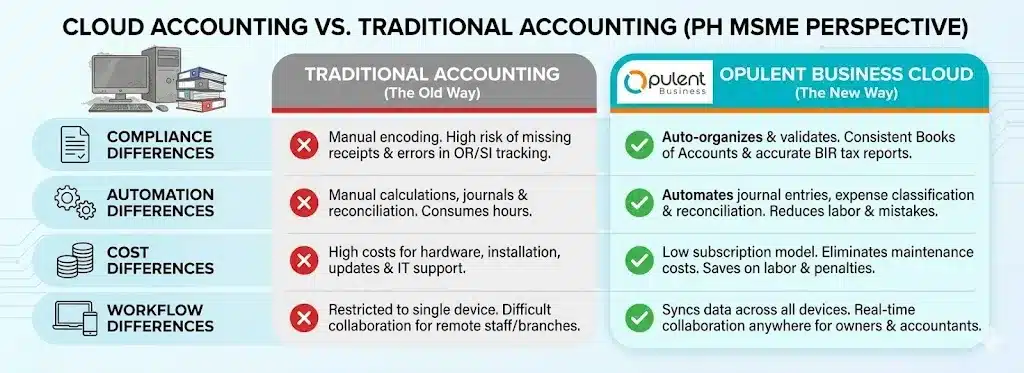
Cloud accounting and traditional accounting differ significantly in how they record, store, and process financial data. Traditional accounting relies on desktop software, manual books, or Excel files, while cloud accounting uses online systems that automate tasks, sync data, and secure records in real time.
For PH MSMEs, the shift from traditional to cloud systems can reduce manual workload, improve accuracy, and simplify BIR compliance.
Compliance Differences
Traditional accounting methods rely heavily on manual encoding, which increases the risk of missing receipts, incomplete records, or errors in OR/SI tracking. Cloud accounting, on the other hand, organizes, validates, and updates compliance-related documents automatically.
This allows MSMEs to maintain consistent Books of Accounts and prepare VAT or Percentage Tax reports more accurately.
Automation Differences
In traditional setups, business owners or staff must manually calculate totals, prepare journals, and reconcile transactions—tasks that consume hours each week. Cloud accounting automates these processes by generating journal entries, classifying expenses, and reconciling balances automatically.
For MSMEs, this reduces labor hours and minimizes mistakes caused by manual data entry.
Cost Differences
Desktop-based accounting often requires hardware, installation, updates, and sometimes IT support. Cloud systems use subscription models and eliminate maintenance costs by keeping everything online.
Because cloud systems reduce manual work, MSMEs spend less on bookkeeping labor, corrections, and compliance penalties.
Workflow Differences for MSMEs
Traditional accounting restricts access to a single device, making collaboration difficult for businesses with remote accountants or multiple branches. Cloud systems sync data across all devices, enabling real-time collaboration between owners, bookkeepers, and accountants.
This benefits PH MSMEs that have rotating staff, shifting cashiers, or owners who need to monitor business performance while off-site.
Benefits of Cloud Accounting for PH MSMEs
Cloud accounting provides several operational and compliance advantages that simplify daily financial tasks for small businesses in the Philippines. Because the system automates, records, and syncs data in real time, MSMEs experience fewer manual errors and gain clearer financial visibility without needing advanced accounting skills.
Below are the key benefits designed specifically around common MSME pain points in the Philippines.
Less Manual Work and Faster Encoding
Most MSMEs manually encode sales, expenses, and cash records using Excel or notebooks. Cloud accounting automates these steps by generating journal entries, classifying expenses, and updating balances when new data enters the system.
This reduces daily workload and helps businesses avoid errors caused by rushed or inconsistent manual inputs.
Real-Time Monitoring for Owners and Bookkeepers
Cloud accounting syncs financial information across all devices, allowing owners, staff, and accountants to view updated data anytime. Whether checking sales totals, expenses, or available cash, MSMEs gain full visibility without waiting for end-of-week or end-of-month reports.
This helps owners make faster and more informed decisions.
Better BIR Compliance Handling
PH MSMEs often struggle to maintain OR/SI, Books of Accounts, and VAT/PT reports. Cloud accounting records, organizes, and validates these documents automatically, significantly reducing compliance mistakes.
This helps avoid penalties, missing records, and last-minute corrections before filings.
Easier Collaboration With Accountants
Traditional accounting limits data access to a single device, making it difficult for accountants to work without physical documents. Cloud accounting shares access with bookkeepers and accountants, allowing them to update records remotely.
This saves MSMEs time, reduces travel, and ensures the books stay updated throughout the month—not only at closing time.
More Accurate Reporting and Financial Visibility
Cloud systems generate financial statements like Income Statements, Balance Sheets, and Cash Flow Reports automatically from recorded transactions. MSMEs can quickly assess their profitability, expenses, and cash position without manually preparing reports.
This helps businesses track performance and prepare requirements for banks, suppliers, or lenders.
More Secure Storage Compared to Notebooks and Excel Files
Many MSMEs still store financial data on USB drives, notebooks, or individual laptops. Cloud accounting protects data through encryption, secure servers, and automated backups.
This ensures financial records remain safe during device damage, staff turnover, or unexpected audits.
Why PH MSMEs Need Cloud Accounting?
Many Philippine MSMEs operate with small teams, variable cash flow, and manual bookkeeping routines that consume time and introduce errors. Cloud accounting automates repetitive tasks, records transactions in real time, and validates tax-related data so owners spend less time fixing mistakes and more time running the business.
Because BIR compliance requires organized Books of Accounts, correct OR/SI handling, and reliable tax summaries, cloud systems that maintain audit logs and prepare VAT/Percentage Tax summaries reduce the risk of penalties and simplify monthly or quarterly filings.
Small businesses often lack dedicated accounting staff, so cloud accounting’s automation and prebuilt workflows help non-accountant owners keep accurate books without heavy training. The result is fewer late adjustments, easier collaboration with external accountants, and better readiness for audits or license renewals.
For MSMEs with limited IT resources, cloud accounting stores data on secure servers with automated backups and access controls—this protects financial records even if a device fails or staff turnover occurs. Because data is centrally stored and encrypted, business owners can safely grant accountants remote access, shortening turnaround time for tax preparation and bank documentation.
Operationally, cloud accounting improves cash visibility by generating up-to-date financial reports—Income Statements, Cash Flow summaries, and Sales Reports—that MSMEs can use to plan purchases, manage cash, and negotiate with suppliers or lenders. This improved visibility reduces surprise cash shortfalls and supports better day-to-day decision making.
Finally, cloud accounting helps MSMEs scale administrative capacity without proportionally increasing bookkeeping costs: the same automated workflows that manage monthly sales, expense categorization, and tax summaries continue to operate reliably as transaction volume grows, preserving accuracy and reducing the marginal cost of growth.
Beyond these core benefits, cloud accounting adapts to specific industries and workflows—such as retail or restaurants—by integrating with POS systems, inventory tools, and industry-specific reporting needs.
Cloud Accounting Use Cases for PH Businesses
Cloud accounting adapts to different business models by organizing, syncing, and processing financial data according to the workflow of each industry. After the core features handle compliance, automation, and reporting, the system supports the day-to-day needs of restaurants, retail stores, freelancers, and startups by aligning accounting tasks with their operational patterns.
Below are the most common use cases for MSMEs in the Philippines.
For Restaurants (Sales, Expenses, and Daily Records)
Restaurants handle high transaction volumes, variable expenses, and frequent supplier purchases. Cloud accounting syncs daily sales totals from POS systems, organizes expenses into categories, and updates cash balances in real time.
Owners can view daily profit, food cost percentages, and cashier performance without exporting spreadsheets. The system generates reports needed for monitoring operations and preparing VAT or Percentage Tax submissions.
For Retail Stores (Inventory + Daily Sales Overview)
Retail stores rely heavily on accurate stock counts and daily sales summaries. Cloud accounting imports POS sales, matches them with inventory records, and reconciles totals to ensure accuracy.
This reduces discrepancies between POS reports and accounting records, making it easier for owners to monitor product performance, restock efficiently, and maintain BIR-ready Books of Accounts.
For Freelancers (Income Tracking and Tax Preparation)
Freelancers often track income manually and struggle to prepare Percentage Tax reports or maintain complete receipt records. Cloud accounting records invoices, organizes expenses, and generates tax summaries automatically, giving freelancers a clear overview of earnings and deductible costs.
This helps ensure compliance and simplifies reporting during quarterly or annual filings.
For Startups (Scalability and Real-Time Reporting)
Startups grow quickly and require accurate financial data to make decisions. Cloud accounting updates financial statements in real time, tracks burn rate, and monitors cash flow.
Because the system scales based on user needs, growing teams can add roles, grant access to remote accountants, and generate investor-ready reports without changing platforms.
Cloud Accounting Costs for PH MSMEs
Cloud accounting changes how MSMEs spend, allocate, and manage costs related to bookkeeping and compliance. Instead of buying hardware, paying for installations, or spending hours on manual encoding, cloud systems use subscription-based pricing and reduce the operational workload associated with traditional accounting.
Below are the cost factors that typically matter to a Philippine MSME.
Subscription Fees Instead of Hardware or Installation
Traditional accounting software often requires upfront hardware, paid installations, and manual updates. Cloud accounting eliminates these costs because it runs entirely online, allowing MSMEs to start with only an internet-connected device.
Subscription fees are predictable and spread over time, making it easier for small businesses to budget.
Fewer Manual Hours for Owners and Staff
Cloud accounting automates journal entries, calculates totals, and updates financial records instantly. These reductions in manual tasks save MSMEs the equivalent of several hours per week—hours that normally require extra staff time or overtime work.
Lower labor requirements reduce both direct payroll expenses and the indirect costs of fixing errors.
Reduced Risk of BIR Penalties and Corrections
Because cloud accounting organizes OR/SI, validates VAT/PT entries, and maintains Books of Accounts automatically, MSMEs face fewer errors during filings. Mistakes caused by manual encoding can result in penalties or re-filing costs.
A cloud system reduces these risks, creating long-term savings while improving compliance reliability.
No Additional IT or Maintenance Costs
PH MSMEs often have limited technical support. Cloud accounting removes the need for:
-
software installations
-
manual updates
-
data recovery services
-
dedicated backup devices
The system updates itself automatically and stores data securely on cloud servers, lowering technical overhead.
More Accurate Data = Smarter Financial Decisions
When cloud accounting generates real-time financial statements, business owners make better purchasing decisions, manage cash flow more efficiently, and avoid unnecessary spending.
Accurate data can indirectly reduce overspending, prevent shortages, and improve financial planning.
How to Choose the Best Cloud Accounting Software in the Philippines
Selecting the right cloud accounting software requires understanding how well the system supports PH workflows, handles BIR requirements, and organizes financial data for MSMEs with limited staff or time. The best option depends on how closely the platform aligns with a business’s daily operations and compliance needs.
Below are essential factors that MSMEs should evaluate when choosing a cloud accounting system.
Check BIR Compliance Features
Not all cloud accounting systems are built for the Philippine market. MSMEs should confirm whether the software can generate OR/SI formats, maintain Books of Accounts, and prepare VAT or Percentage Tax summaries correctly.
If these functions are missing, users will still need manual work to meet BIR requirements—defeating the purpose of automation.
Evaluate Automation Capabilities
Automation determines how much time the software actually saves. Look for a system that creates journal entries automatically, categorizes expenses, and reconciles sales consistently.
Stronger automation means fewer errors, less encoding, and faster month-end closing.
Confirm POS Compatibility and Integration
For MSMEs that use a POS system, the cloud accounting tool should be able to import daily sales, match records with accounts, and sync transaction details accurately.
This simplifies daily closing and ensures that sales totals match accounting records without manual adjustments.
Assess Reporting Tools and Financial Visibility
A good cloud accounting system should generate complete financial statements—Income Statement, Balance Sheet, Cash Flow—and update them in real time.
This allows owners to see performance clearly, plan cash flow, and track business stability without manual preparation.
Look for Security and Access Controls
Cloud accounting must keep financial data protected through encryption, role-based access, and routine backups. MSMEs often share devices or rotate staff, so access controls help maintain accurate and secure financial records.
This prevents unauthorized changes and protects sensitive information.
Consider Ease of Use and Training Requirements
Small businesses often operate with limited administrative staffing. A suitable cloud accounting system should offer a simple interface that organizes data clearly, reduces manual steps, and supports users who are not accounting experts.
This minimizes training time and helps owners integrate accounting into daily operations smoothly.
Check Scalability and Multi-User Support
As MSMEs grow, they may add branches, increase staff, or expand operations. The cloud accounting tool must accommodate additional users and handle higher transaction volumes without performance issues.
Scalability ensures that businesses do not outgrow the system.
How to Get Started With Cloud Accounting (Simple Steps for PH MSMEs)
Getting started with cloud accounting is straightforward because the system organizes financial data automatically and reduces the manual setup work needed in traditional accounting tools. MSMEs can transition gradually by preparing essential records and following a simple onboarding order that ensures accuracy from the beginning.
Here are the steps small businesses in the Philippines typically follow when adopting a cloud accounting system.
Gather Your Existing Financial Records
Before setting up the system, MSMEs should collect:
-
Sales records
-
Expense receipts
-
Invoices
-
OR/SI copies
-
Existing Books of Accounts
-
Beginning balances
Cloud accounting imports or encodes this data to establish a clean starting point.
Set Up the Chart of Accounts
The chart of accounts is the structure where all financial transactions are classified. Cloud accounting tools usually provide templates, but MSMEs should review categories to ensure they match:
-
business type
-
tax type (VAT/PT)
-
operational workflow
The system will then map future entries to the correct accounts automatically.
Add Users, Roles, and Access Levels
MSMEs can assign separate access roles for:
-
owners
-
accountants
-
bookkeepers
-
cashiers
Using role-based permissions, the system controls who can view, edit, or approve transactions, protecting the integrity of financial records.
Input Beginning Balances and Historical Data
To ensure accurate reporting, the starting balances for:
-
cash
-
inventory
-
receivables
-
payables
-
equity
must be recorded correctly. Many cloud systems let MSMEs upload spreadsheets or enter amounts manually. Once this is done, real-time reporting becomes accurate.
Start Recording Daily Transactions
Once the system is set, MSMEs can begin recording:
-
sales
-
expenses
-
supplier payments
-
collections
-
small cash disbursements
Cloud accounting will generate journal entries automatically and sync the updated data across devices.
Review Reports Monthly
Businesses should check:
-
profit
-
cash flow
-
expense trends
-
tax summaries
Cloud systems update these reports continuously, giving MSMEs a reliable basis for planning purchases, managing capital, and preparing BIR filings.
Collaborate With Your Accountant
Finally, MSMEs can grant access to their accountant or bookkeeper, allowing them to:
-
review entries
-
update classifications
-
prepare reports
-
check compliance
Shared access reduces backlogs and improves accuracy during monthly or quarterly filings.
Conclusion
Cloud accounting gives PH MSMEs a simpler way to manage financial records, reduce manual work, and maintain BIR compliance with less effort. By automating key bookkeeping tasks and providing real-time access to financial data, it helps small businesses stay organized and better prepared for daily operations, filings, and growth.
FAQ
Q1. What is cloud accounting in simple terms?
Cloud accounting is an online system that records, organizes, and updates your financial data in real time, helping PH MSMEs automate bookkeeping and stay BIR-compliant without relying on desktop software.
Q2. Is cloud accounting allowed by the BIR?
Yes. Cloud accounting is allowed as long as it follows BIR formatting rules, maintains Books of Accounts, generates OR/SI, and keeps audit logs required during inspections or renewals.
Q3. How is cloud accounting different from traditional accounting?
Traditional accounting uses manual encoding and desktop files, while cloud accounting automates entries, syncs data across devices, and stores records securely online—reducing errors and saving time.
Q4. Can small businesses in the Philippines use cloud accounting?
Yes. Cloud accounting is designed for MSMEs because it simplifies bookkeeping, reduces manual work, and provides real-time access for owners, staff, and accountants.
Q5. Does cloud accounting work with POS systems?
Yes. Cloud accounting can sync daily sales totals from POS systems, helping MSMEs reconcile sales and maintain accurate financial records without manual encoding.
Q6. How much does cloud accounting cost for MSMEs?
Costs vary, but cloud systems usually use subscription pricing and eliminate hardware, installation, and maintenance expenses—making them more cost-effective for MSMEs than desktop solutions.
Q7. Which is the best cloud accounting software in the Philippines?
Opulent Business ( OpulentBiz) is one of the most suitable cloud accounting systems for PH MSMEs because it supports BIR compliance, automates bookkeeping, syncs POS sales, and organizes financial data based on local tax requirements. Its features are designed around Philippine workflows, making it a practical choice for small businesses that need accurate records and easier compliance.